ChackTok -Photobooth Event App
- 4.4
- Rating
- 100.00K
- Installs
- Free
- Price

 Analysis by App-foxy
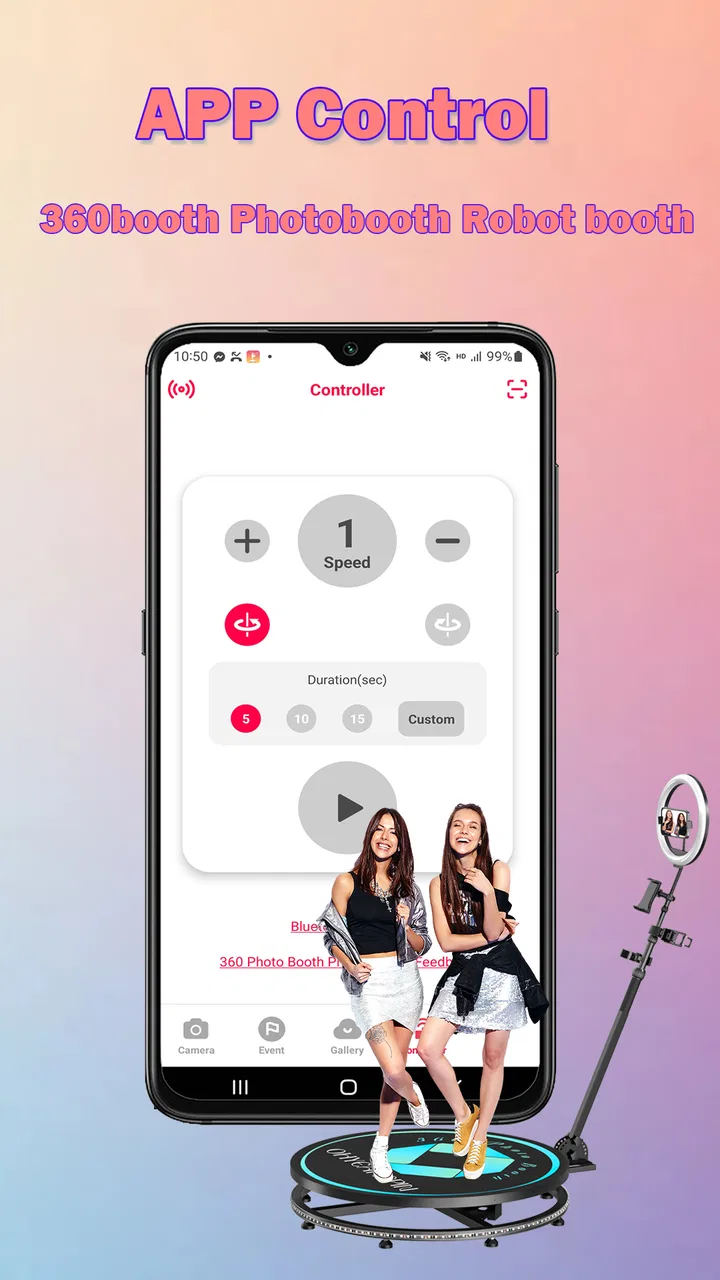
I approached ChackTok -Photobooth Event App as a practical photography tool rather than a novelty camera. Its purpose is clear: help turn a tablet or phone into a 360 and iPad photo booth, with templates, event-oriented controls, and ways to share finished pictures quickly. After spending time with that workflow, I think it makes the most sense for people who regularly create guest photos at parties, school activities, brand events, or small gatherings.
The important distinction is that this is not simply a camera app with a few decorative filters. The experience is built around a repeatable booth session: prepare the visual style, capture people in a controlled space, apply the chosen presentation, and get the result ready for sharing. That focus makes it more useful than a normal camera when several guests need the same kind of experience, but it also means casual photographers may find it more specialized than necessary.
How I would use it at a real event
My baseline workflow would begin before guests arrive. I would choose the device position, check the available space around the booth, and decide whether the event is better suited to a 360-style capture or an iPad-based setup. The app’s value depends heavily on this preparation. A booth application cannot fix a cramped area, poor lighting, or an awkward camera angle after the fact, so I would treat the physical arrangement as part of the setup rather than an afterthought.
You May Also Like

 Pandora - Music & Podcasts
Pandora’s Music Is Easy to Start, but Harder to Recover
Pandora’s strength is its low-effort path from a seed to a station. Its weak spot is how much confidence it asks you to place in connection, setup, and quiet recovery.

 AccuWeather: Weather Radar
AccuWeather Review: A Quick, Clear Forecast for Everyday Decisions
For everyday plans, the best forecast is the one you can understand quickly. AccuWeather makes rain timing, radar, and local conditions easy to act on, with a few trade-offs.

 Hill Climb Racing
Why Hill Climb Racing Still Turns Crashes Into One More Run
A tiny car, a bumpy hill and one more upgrade: Hill Climb Racing keeps resurfacing because its simple chaos makes every near-miss feel personal.

 AliExpress - Shopping App
AliExpress Makes Global Shopping Feel Personal, but Shoppers Bear the Risk
AliExpress turns a global marketplace into a pocket-sized discovery engine. Its reach is useful, its shopping loop compelling, and its trade-offs easy to miss.

 Lords Mobile: Kingdom Wars
Lords Mobile Is a Kingdom-Building Routine, Not a Quick Match
A case-by-case verdict on the building, battles, device demands, and social commitments that make Lords Mobile rewarding for some players and exhausting for others.

 PDF Scanner app - TapScanner
TapScanner Makes Paperwork Easier to Capture, Check, and Share
TapScanner makes scanning with a phone feel less like a rescue operation and more like a dependable step in getting work done. Its capture tools are useful, though not flawless.
More From Our News Desk
View All News


Once the space is ready, I would select a template that matches the event instead of changing the design for every guest. Consistency is one of the quiet strengths of a booth workflow. A birthday gathering, school celebration, and business event may need different visual treatments, but within one event, a stable template makes the output feel intentional and keeps the operator from making decisions while a queue is waiting.
The app is listed in the Photography category, but I would judge it by event reliability and speed rather than by the same standards I use for a manual camera app. The useful question is not whether it offers every control a photographer might want. It is whether a person can guide guests through a capture, produce something attractive, and move on without turning the session into a technical demonstration.
In an everyday scenario, imagine a family party where one person is responsible for music, guests, and photos. I would prepare the booth during a quiet moment, run a short test with two people, and leave the app ready for guests to approach. That test is especially important for checking whether the selected layout works with the available background and whether people understand where to stand. A polished template can still look poor if the group is positioned too close or spreads outside the intended frame.
For a professional event operator, the same process becomes a routine. I would keep a small checklist covering the device position, the chosen template, the sharing step, and the battery or charging arrangement. The app can simplify the digital side, but it does not remove the need for an operator who notices when a guest is partly out of frame or when a group needs clearer instructions.
Why the template choice matters more than it first appears
Templates are not just decoration. They influence how much room guests have, where the final image draws attention, and how quickly the result can be understood when it appears on a screen. I would test the template with the largest likely group, not only with one person. A design that looks balanced for a solo portrait may become crowded when several people stand together.
I would also avoid changing templates repeatedly during a busy session. That sounds flexible, but it creates avoidable pauses and makes the event feel less organized. A better habit is to prepare one primary design and, if needed, one alternative for a different part of the event. This is a simple operational improvement rather than a hidden function, but it makes the app feel much more capable in practice.
Settings I would check before inviting guests
The first settings worth checking are the ones that affect the capture sequence and the final presentation. I would look at the selected template, the event identity shown in the design, and the sharing path I intend to use. The store summary highlights templates, event use, and instant sharing, so these are the areas I would verify first instead of spending time searching for advanced camera controls.
I would run a complete capture from beginning to end. Starting a session is not enough; I would make sure the result appears as expected and that the sharing step feels understandable. This catches the kind of friction that is easy to miss when testing only the camera view. If the app is being used by a volunteer or a colleague, I would let that person perform the test without instructions. Their hesitation often reveals a confusing step more clearly than my own familiarity does.
On an iPad, I would pay attention to how the interface feels at the distance guests will see it. A booth screen needs to be readable without the operator standing directly beside it. On a 360 setup, I would be even more careful about the physical relationship between the device, the people being photographed, and the surrounding space. The app can organize the event workflow, but the quality of the result still depends on keeping the subject inside the intended capture area.
Another useful check is the sharing routine. “Instant” sharing is valuable only when the operator knows exactly what happens after the image is created. I would rehearse that step and decide who is responsible for it. At a small party, the guest may handle the final share. At a formal event, I would prefer one operator to control the process so the device is not passed around unnecessarily.
It is also worth separating the creative setup from the event setup. I would choose the visual treatment first, then check the practical flow with that treatment active. Mixing those decisions while guests are waiting is where many booth sessions become slow. ChackTok is most convincing when it is treated like a prepared station, not like a camera opened for spontaneous experimentation.
Small habits that make repeated sessions faster
The fastest pattern I found is to reduce choices. Experienced use does not mean touching every option; it means deciding in advance what should remain unchanged. I would prepare a standard event template, a short instruction for guests, and a consistent position for the device. This makes each capture easier to supervise and gives the final collection a coherent look.
I would also group testing into one deliberate rehearsal rather than making tiny adjustments after every guest. For example, I would test with a solo subject, then with a group, and then complete the sharing step. Those three checks expose different problems: framing, available space, and delivery. Once they work, I would avoid unnecessary changes unless the environment itself changes.
For a busy event, I would assign roles whenever possible. One person can welcome guests and explain the pose, while another monitors the screen and handles the final share. If only one person is available, I would position the booth where the operator can see both the guests and the device. This is a practical trade-off: a more automated setup may be attractive, but human guidance still improves the outcome when people are unfamiliar with a 360 or tablet booth.
A less obvious advantage of a repeatable template is that it makes troubleshooting easier. If every session uses a different design, it becomes difficult to tell whether a problem comes from the environment or the layout. Keeping the visual setup stable gives me a baseline. I can then change one thing at a time, such as the guest position or the device angle, rather than guessing.
I would keep the app focused on the booth task instead of treating it as a general editing suite. If I want extensive manual retouching, layered design work, or the kind of detailed control found in a dedicated photography editor, I would use a separate tool. ChackTok’s advantage is the event pipeline, not exhaustive post-production.
Where the app fits beside ordinary camera and booth alternatives
A normal phone camera is simpler for one-off snapshots. It opens quickly, requires little preparation, and gives the photographer direct control. If my goal were to take a few informal pictures at dinner, I would probably choose the ordinary camera. ChackTok becomes more appealing when multiple people need a shared experience and the output should follow a recognizable event format.
Compared with a basic photo booth application, the 360 and iPad focus gives this app a more specific identity. That can be a strength for operators who want an event station rather than a collection of unrelated camera effects. The compromise is that the setup is less universal. Someone looking for a broad selfie editor, a manual camera, or a full image-processing toolkit may feel constrained by the booth-centered design.
It also sits between doing everything manually and renting a large dedicated booth service. The app can make a suitable device more useful for an event, but it does not magically provide the physical equipment, lighting, backdrop, staff, or venue planning associated with a complete professional installation. I would recommend it to someone who already has a workable space and device, not to someone expecting the app alone to create a finished commercial booth operation.
The developer is shown as 360 photo booth, which matches the product’s narrow event purpose. Its average rating is 4.4 from over 500 ratings, and it has passed 100K installs. Those figures suggest that the concept has reached a meaningful audience, while the rating is encouraging without being a reason to skip practical testing. For an event tool, my own rehearsal would matter more than popularity because the physical setup varies so much from one venue to another.
Costs, access, and the practical commitment
The app is free to download, which lowers the barrier to trying the workflow before committing to an event. That is useful for a family organizer or a small operator who wants to see whether a tablet-based booth suits their needs. There are in-app purchases ranging from $19.99 to $599.99 per item, so I would inspect the purchase options carefully before building a paid service around it.
That range is important because “free” does not necessarily mean that every event-oriented capability will fit every budget. I would test the free experience first, identify which part of the workflow I genuinely need, and avoid purchasing simply because an event is approaching. For occasional personal use, the cost structure may make the app less attractive if the required option is more than the event itself justifies. For repeated paid events, the calculation is different, but I would still compare the purchase against a dedicated booth solution and the amount of operator time saved.
The content rating is Teen, so I would consider the audience and venue before handing the device to children. That rating does not replace event supervision. In a school or family setting, I would keep an adult responsible for the device and the sharing process, especially when guests are moving through quickly.
The app was released on April 28, 2022, and the current version is 1.9.5. It supports devices running at least OS 9. For me, that makes compatibility checking a necessary first step when using an older tablet or phone. I would install it on the actual device planned for the event, not assume that a different device’s performance guarantees the same experience.
Limits that experienced users should plan around
The biggest limitation is that the app cannot compensate for weak event design. If the background is distracting, the space is too narrow, or guests are unsure where to stand, the final images may disappoint even when the software behaves correctly. I would therefore spend more time on positioning and instructions than on searching for extra effects.
Another limitation is the potential tension between speed and control. A prepared booth flow is quick because it removes decisions. Photographers who want to adjust every image individually may find that approach restrictive. I would not choose this app as my primary tool for carefully composed portraits, detailed editing, or a long creative session with one subject.
Sharing also deserves realistic expectations. Fast delivery is helpful, but it still depends on an organized handoff and a stable event routine. If every guest needs personal assistance, the queue can grow. My solution would be to explain the process before capture and keep the operator’s role consistent. The app can shorten the digital steps, but it cannot eliminate human bottlenecks.
The purchase range creates another boundary. A person planning one small celebration should compare the total cost of the desired features with simpler alternatives. Someone running several events may value the repeatability more, particularly if templates and a consistent capture flow reduce setup time. The right choice depends less on the headline price and more on how often the workflow will be used.
I would also skip it if my main requirement were a conventional social camera. The store short description is “ChackTok,” but the more useful way to understand the product is as an event photo-booth tool. That distinction matters: it is designed around a station and a group experience, not around replacing every camera or editing app on a phone.
Who will get the most from it
I see the strongest fit for event planners, small photo-booth operators, party hosts, schools, clubs, and businesses that want a branded or themed capture point without immediately investing in a large dedicated system. It is especially suitable for users who prefer a repeatable workflow over manual photography and who are comfortable preparing the space before guests arrive.
It can also suit a technically confident friend organizing a wedding reception or birthday event, provided that person is willing to test the complete process. The app is not something I would install moments before guests enter. Its best results come from making the creative and operational decisions in advance.
I would recommend a different option to a photographer who needs full manual exposure control, extensive retouching, or highly customized graphic composition. I would also point occasional users toward a regular camera if they only need quick snapshots. ChackTok earns its place when the event format itself is the problem being solved.
My verdict after treating it like a working booth
ChackTok -Photobooth Event App is most effective when I use it as the control center for a prepared photo station. Its combination of 360 and iPad support, templates, event orientation, and quick sharing gives it a clear purpose. I like that the workflow encourages consistency: choose the presentation, test the physical arrangement, guide guests, and deliver the result without turning every capture into a separate editing project.
My recommendation comes with a condition: test the exact device, template, space, and sharing routine before the event. The app’s strengths appear when those pieces are aligned, while its weaknesses become obvious when users expect the software to solve venue or equipment problems. The free entry point makes an initial trial sensible, but the in-app purchase range means I would make a deliberate budget decision rather than assume every useful option is included.
For someone who wants a repeatable booth experience and is prepared to manage the surroundings, this is a focused and practical photography app. For someone seeking a general-purpose camera or a deep editing system, it is the wrong tool. The real payoff is not having more buttons; it is having a reliable pattern that guests can understand and an operator can repeat.
FAQs for ChackTok -Photobooth Event App
01What is ChackTok - Photobooth Event App used for?
ChackTok - Photobooth Event App is designed to support photo booth experiences at events such as weddings, parties, corporate gatherings, festivals, and brand activations. It can help guests capture photos, apply available effects or layouts, and share the results digitally, depending on how the event organizer has configured the service. Its usefulness therefore depends on the specific booth setup and event package.
02Do I need an account or special equipment to use ChackTok?
In most event situations, guests can use ChackTok through the photo booth or event workflow without purchasing special equipment themselves. However, certain features may require an event code, invitation, login, or access provided by the organizer. The application is generally intended to work alongside compatible photobooth hardware or a managed event service, so availability may differ from a regular standalone camera app.
03Can I save and share photos created with ChackTok?
The app is intended to make event photos easier to receive and share, although the exact options depend on the organizer’s configuration and the equipment connected to the service. Possible delivery methods may include downloading images, receiving a gallery link, scanning a QR code, or sharing through supported social platforms. Users should check the event instructions because photos may not remain available indefinitely.
04Is ChackTok free to download and use?
The application may be available to download without an upfront charge, but that does not necessarily mean every photobooth service is free. Event organizers, venues, or hired photobooth providers may pay for the platform and determine which features guests can access. Before downloading or using it, review the store listing and event instructions for possible subscriptions, paid packages, usage limits, or additional service fees.
05What should I know about privacy when using ChackTok at an event?
Because ChackTok handles photographs and may provide online delivery or sharing, privacy is an important consideration. Photos could be stored temporarily or hosted through a gallery managed by the event provider, and some features may involve contact details or social sharing. Before participating, review the app’s privacy policy and the organizer’s terms, especially if children appear in photos or you plan to publish images publicly.
Pros
- Creates branded photo experiences for weddings
- parties
- and corporate events.
- Lets guests share photos digitally instead of relying only on printed pictures.
- Can help event hosts collect memorable user-generated content in one place.
- Interactive booth features can encourage guests to participate and socialize.
- Useful for event planners seeking a customizable guest-engagement tool.
Cons
- Requires reliable internet access for smooth sharing and uploads.
- Photo quality may depend on the host device
- lighting
- and booth setup.
- Some customization or event features may require a paid plan.
- Guests may need to grant camera or photo permissions before using it.
- Managing large event galleries can become time-consuming for organizers.

ChackTok -Photobooth Event App
Gallery